My vibe-coding stack in 2026: where Pilothouse fits
My 2026 agent stack: Claude Code, Codex, OpenCode and Grok Build in herdr, Tailscale between machines, and Pilothouse for rules and phone approvals.
I don’t write most of my code by hand anymore. On a normal day I have three to six agents going: Claude Code on the main feature, Codex reviewing a diff, OpenCode or Grok Build poking at something on the side. That stopped feeling like magic months ago. Now it feels like running a small team, and the hard part isn’t the prompting. It’s everything around it: where the agents live, how I know which one is stuck, and what they’re allowed to do when I’m not looking.
This is the stack I’ve settled on and what each piece is for. Full disclosure: I build one of these tools (Pilothouse).
The short version
| Layer | What I use | Job |
|---|---|---|
| Agents | Claude Code, Codex CLI, OpenCode, Grok Build | Do the work |
| Where they live | herdr | Terminals that keep running when I close the window, one sidebar for every agent |
| Editor | Whatever I’m reviewing in | Read diffs, fix the last 10% |
| Network | Tailscale | My laptop, desktop and phone on one private network |
| Rules and approvals | Pilothouse | A rule check before every tool call, and approvals that reach my phone when I’m away |
Agents: use more than one
Each agent is good at different things, and using two of them on the same problem catches mistakes. My split right now:
- Claude Code for the main line of work and anything with a plan step.
- Codex CLI for reviews and second opinions on a diff.
- OpenCode when I want to try a different model without changing my habits.
- Grok Build for quick, contained tasks.
The downside of using several agents is that each one has its own permission prompts, its own settings file and its own idea of what’s safe.
herdr: where the agents live
herdr is a terminal workspace built for coding agents. Your agents run in real terminal panes inside a background server, so closing the client (or losing SSH) doesn’t kill them. It sorts panes into workspaces and tabs, and it marks every agent as working, blocked, done or idle so you can see which one needs you. It also recognizes Claude Code, Codex, OpenCode, Grok and a long list of other CLIs, and it can add remote machines over SSH to the same sidebar.
curl -fsSL https://herdr.dev/install.sh | sh   # or: brew install herdr
herdr                                          # start or attach in your project folder
herdr answers the question “which of my agents needs me?” It doesn’t try to decide what an agent is allowed to do, and it isn’t built around answering a permission prompt from your phone with your own rules behind it. That’s the gap Pilothouse fills, so the two fit together well.
Pilothouse: rules before every tool call, approvals that follow you
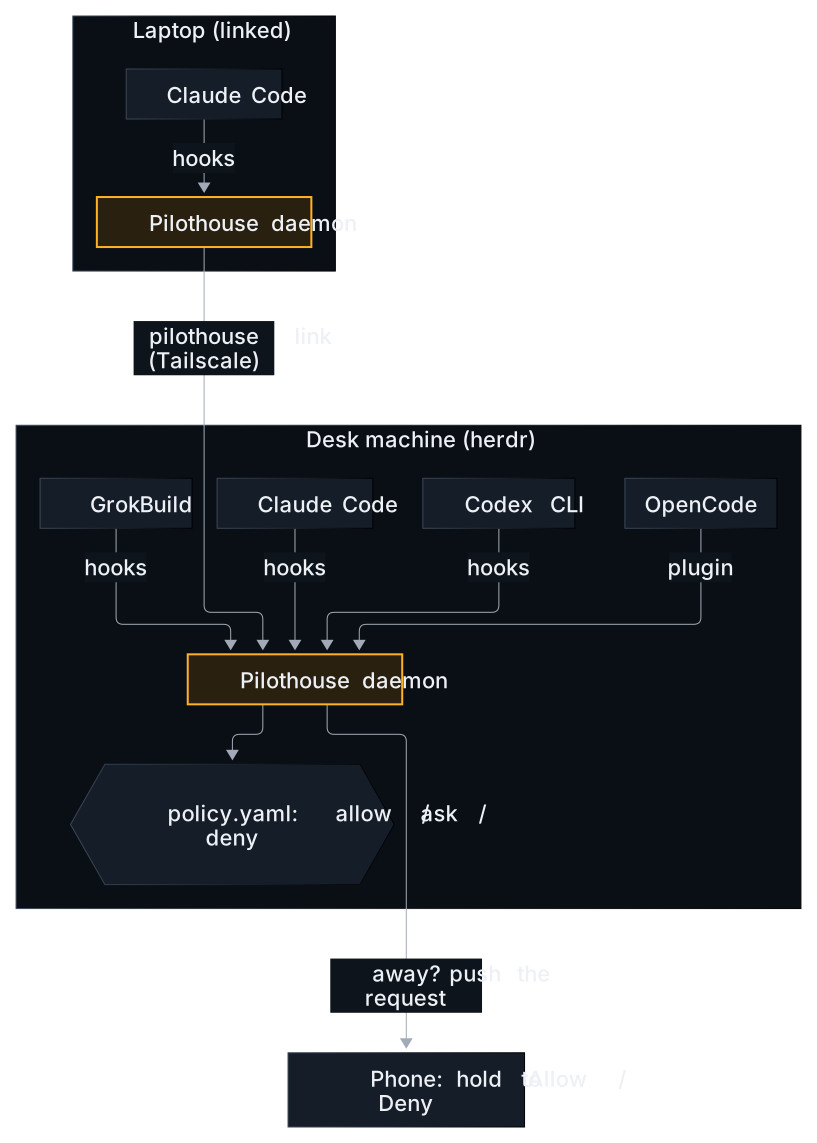
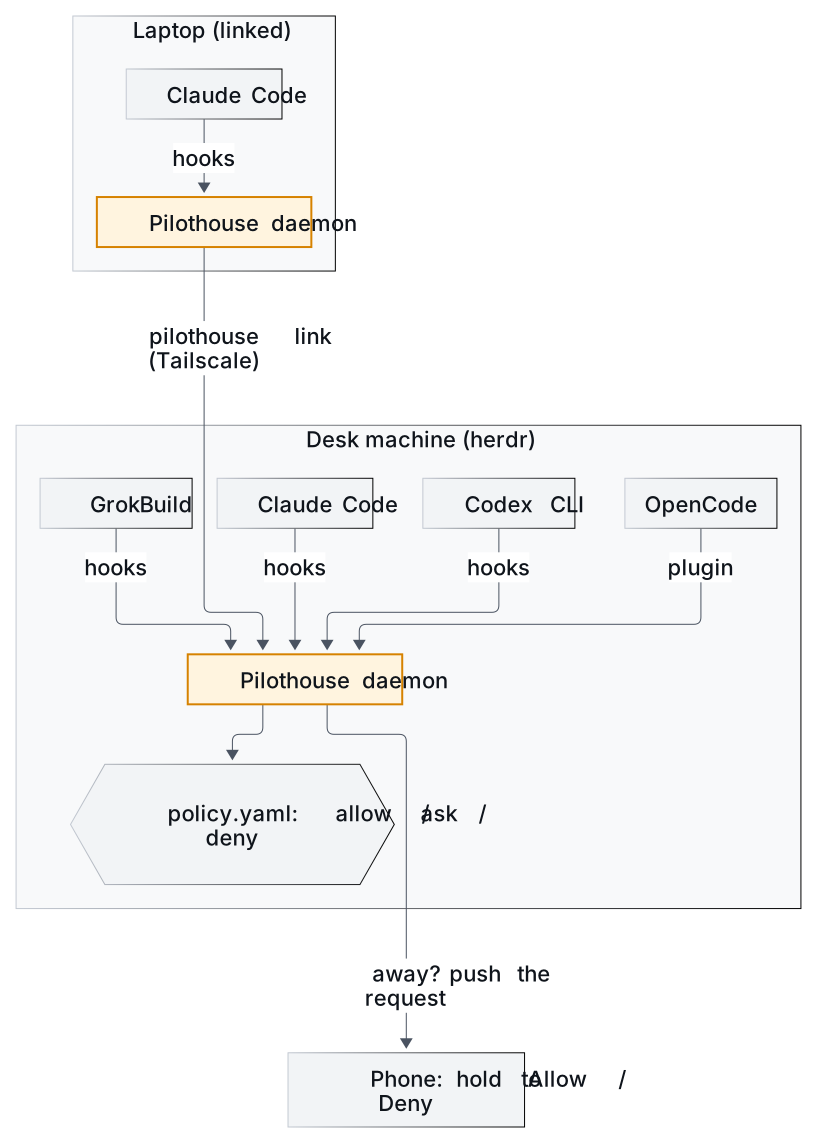
Pilothouse is a single open-source Go binary. It installs the agents’ official hooks (a small plugin for OpenCode) and runs a local daemon. Every tool call an agent is about to make goes past your rules first, and every session shows up in one inbox.
brew install sabr-software/tap/pilothouse   # or: curl -fsSL https://pilothouse.dev/install.sh | sh
pilothouse demo        # optional: try the phone app with pretend agents
pilothouse setup       # shows the hook diff first, starts the daemon, pairs your phone
Three things it adds to the stack:
-
Rules before every tool call. A YAML file, with optional CEL expressions:
# ~/.pilothouse/policy.yaml
version: 1
rules:
  - name: no-force-push
    match: { kind: shell, command: "git push*" }
    when: 'command.matches("(--force|-f)\\b")'
    action: deny
    message: Force-push is blocked. Open a PR instead.

  - name: ask-before-pushing-main
    match: { kind: shell, command: "git push*{main,master}*" }
    action: ask

  - name: no-secrets
    match: { path: "**/.env*" }
    action: deny
Any
denywins. If you don’t want to write YAML, the presets cover the common cases:pilothouse policy preset guarded-autopilot onlets routine work in a repo run without prompts, blocks destructive commands and asks before pushes, deploys, secrets and sudo. -
Approvals that follow you. At the desk, the agent’s own prompt shows up as usual. When the keyboard goes idle, approval requests from Claude Code, Codex and OpenCode are held and pushed to your paired phone with the command, a diff for edits and risk labels. Allowing takes a one-second press and hold, so a stray tap can’t approve anything.
-
One inbox for every machine. Since 0.4,
pilothouse linklets one machine (the hub) show every machine’s sessions in the same app, labelled by machine.
How herdr and Pilothouse fit together
-
herdr runs the terminals and shows who’s blocked. Pilothouse decides what’s allowed and lets you answer from anywhere. Run your agents in herdr panes the way you already do. Pilothouse’s hooks still see every tool call.
-
Pilothouse tasks open in herdr.
pilothouse task new "fix the flaky checkout test"starts an agent in its own git worktree. Tap Open in herdr in the Pilothouse app and that agent shows up in a new herdr tab on the computer, in the repo’s workspace. To do that for every task you start from your phone:# ~/.pilothouse/config.yaml desktop: open: auto # a herdr tab when herdr is running, else a Terminal window on macOS open_tasks: true -
Two kinds of multi-machine. herdr adds machines over SSH so you can drive them from one sidebar. Pilothouse links machines over Tailscale so you can approve for them from one phone, and each machine checks your phone’s signature itself.
Tailscale: the boring part that makes it work
Pilothouse has no account and no cloud relay. Your phone reaches the web app your own machine serves, over your tailnet:
pilothouse remote tailscale   # HTTPS on your tailnet via Tailscale Serve, nothing public
pilothouse pair               # scan the code; on iOS add it to the Home Screen first
No Tailscale? pilothouse notify telegram lets you answer from a Telegram bot you create, and pilothouse notify ntfy works too.
My setup, start to finish
# 1. Agents: Claude Code, Codex, OpenCode, Grok Build (install from each vendor)
# 2. herdr
curl -fsSL https://herdr.dev/install.sh | sh
# 3. Pilothouse
brew install sabr-software/tap/pilothouse
pilothouse setup
pilothouse policy preset guarded-autopilot on
pilothouse policy preset no-secrets on
# 4. Phone
pilothouse remote tailscale && pilothouse pair
# 5. Work
herdr          # then, in a pane:
claude         # hooks apply either way
# or, for replies and a live terminal from your phone:
pilothouse run claude
If you want to see how I run Codex, Claude Code and Grok side by side, that’s the next post. The rules I actually use are in Guardrails for vibe coders.
Pilothouse is Apache-2.0 on GitHub. Issues and “this broke my setup” reports are very welcome.